[et_pb_section fb_built=”1″ _builder_version=”4.27.4″ _module_preset=”default” global_colors_info=”{}” theme_builder_area=”post_content”][et_pb_row _builder_version=”4.27.4″ _module_preset=”default” global_colors_info=”{}” theme_builder_area=”post_content”][et_pb_column type=”4_4″ _builder_version=”4.27.4″ _module_preset=”default” global_colors_info=”{}” theme_builder_area=”post_content”][et_pb_text _builder_version=”4.27.4″ _module_preset=”default” hover_enabled=”0″ global_colors_info=”{}” theme_builder_area=”post_content” sticky_enabled=”0″]
In an era where remote and hybrid work models dominate, businesses need tools that bridge the gap between physical offices and distributed teams. Bitrix24, already renowned for its CRM capabilities, offers a powerful solution: the Bitrix24 Virtual Office. This integrated workspace combines communication, project management, and collaboration tools into a single platform, empowering teams to work efficiently from anywhere. Let’s dive into how Bitrix24 Virtual Office is transforming modern workplaces.
What is Bitrix24 Virtual Office?
Bitrix24 Virtual Office is a unified digital workspace designed to replicate—and enhance—the functionality of a physical office. It integrates real-time communication, task management, document sharing, and workflow automation, all within a secure, cloud-based environment. Whether your team is fully remote, hybrid, or in-office, Bitrix24 Virtual Office streamlines operations while fostering collaboration and transparency.
Key Features of Bitrix24 Virtual Office
1. Seamless Communication Tools
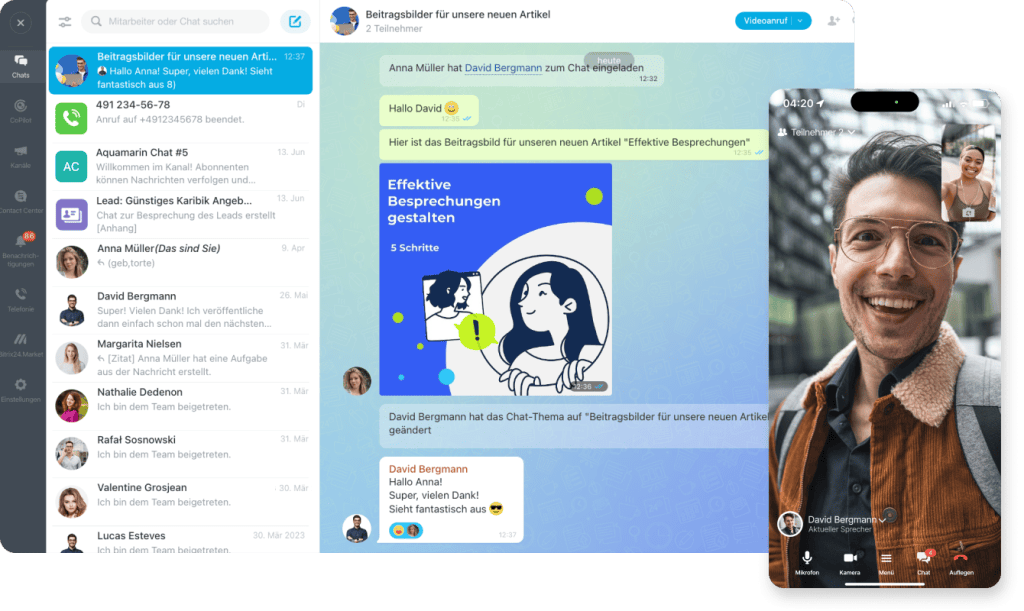
Bitrix24 eliminates silos with a suite of communication features:
- Instant Messaging: Group chats, private conversations, and threaded discussions.
- Video Conferencing: Host HD meetings with screen sharing, recording, and calendar integration.
- Company Social Network: A Facebook-like feed for announcements, updates, and employee engagement.
2. Task and Project Management
Keep projects on track with tools tailored for remote teams:
- Kanban Boards and Gantt Charts: Visualize workflows and deadlines.
- Task Dependencies: Assign priorities, set deadlines, and track progress in real time.
- Time Tracking: Monitor hours spent on tasks for accurate productivity analysis.
3. Document Collaboration
Centralize file management to avoid chaos:
- Cloud Storage: Securely store and share documents, spreadsheets, and media.
- Real-Time Editing: Collaborate on files simultaneously (like Google Docs).
- Version Control: Track changes and restore previous versions effortlessly.
4. Virtual Workspaces
Create dedicated hubs for teams, projects, or departments:
- Customizable Workspaces: Add tasks, calendars, files, and chat channels.
- Role-Based Access: Control permissions to safeguard sensitive data.
5. Employee Directory and HR Tools
- Staff Profiles: Access contact details, skills, and availability.
- Workload Management: Balance tasks based on employee capacity.
- Leave Management: Submit and approve time-off requests within the platform.
6. Integration with Bitrix24 CRM
Leverage the power of Bitrix24’s CRM within the Virtual Office:
- Link customer data to tasks and projects.
- Automate workflows triggered by CRM updates (e.g., deal closures).
7. Mobile Accessibility
Access the Virtual Office on-the-go via iOS and Android apps, ensuring productivity from any location.
Pros and Cons of Bitrix24 Virtual Office
Pros:
- All-in-One Platform: Combines communication, project management, and CRM in a single interface.
- Cost-Effective: Free plan available; paid plans start at $24/month for advanced features.
- Scalable: Suitable for teams of 5 to 5,000+ users.
- Self-Hosted Option: Ideal for businesses requiring full data control.
- User-Friendly: Intuitive design with minimal training required.
Cons:
- Feature Overload: New users may feel overwhelmed by the sheer number of tools.
- Limited Third-Party Integrations: While robust, it lacks some connectors found in Slack or Microsoft Teams.
- Performance Variability: Occasional lag during high-demand periods in the cloud version.
Who Should Use Bitrix24 Virtual Office?
Bitrix24 Virtual Office is ideal for:
- Remote and Hybrid Teams: Streamline communication across time zones.
- Small to Medium Businesses: Affordable alternative to pricier tools like Microsoft 365.
- CRM Users: Companies already leveraging Bitrix24’s CRM benefit from seamless integration.
- Industries Requiring Collaboration: Marketing agencies, IT firms, consultancies, and nonprofits.
Conclusion
Bitrix24 Virtual Office redefines remote work by merging the essentials of a physical office—communication, collaboration, and organization—into a dynamic digital space. Its integration with Bitrix24’s CRM and project management tools makes it a standout choice for businesses aiming to boost productivity while maintaining team cohesion. While the platform’s extensive features may require a short adjustment period, the payoff in streamlined workflows and centralized operations is undeniable.
For teams ready to embrace the future of work, Bitrix24 Virtual Office offers a flexible, cost-effective solution. Start with its free tier to explore its capabilities, and scale up as your business grows. In a world where flexibility is key, Bitrix24 ensures your team stays connected, efficient, and ahead of the curve.
[/et_pb_text][/et_pb_column][/et_pb_row][/et_pb_section]