
Understanding APIs
When you think about how different software applications communicate with each other, you might envision a complex web of interactions. This is where an Application Programming Interface (API) comes into play. To understand APIs fully, let’s break down what they are, why they matter, and how they function.
What is an API?
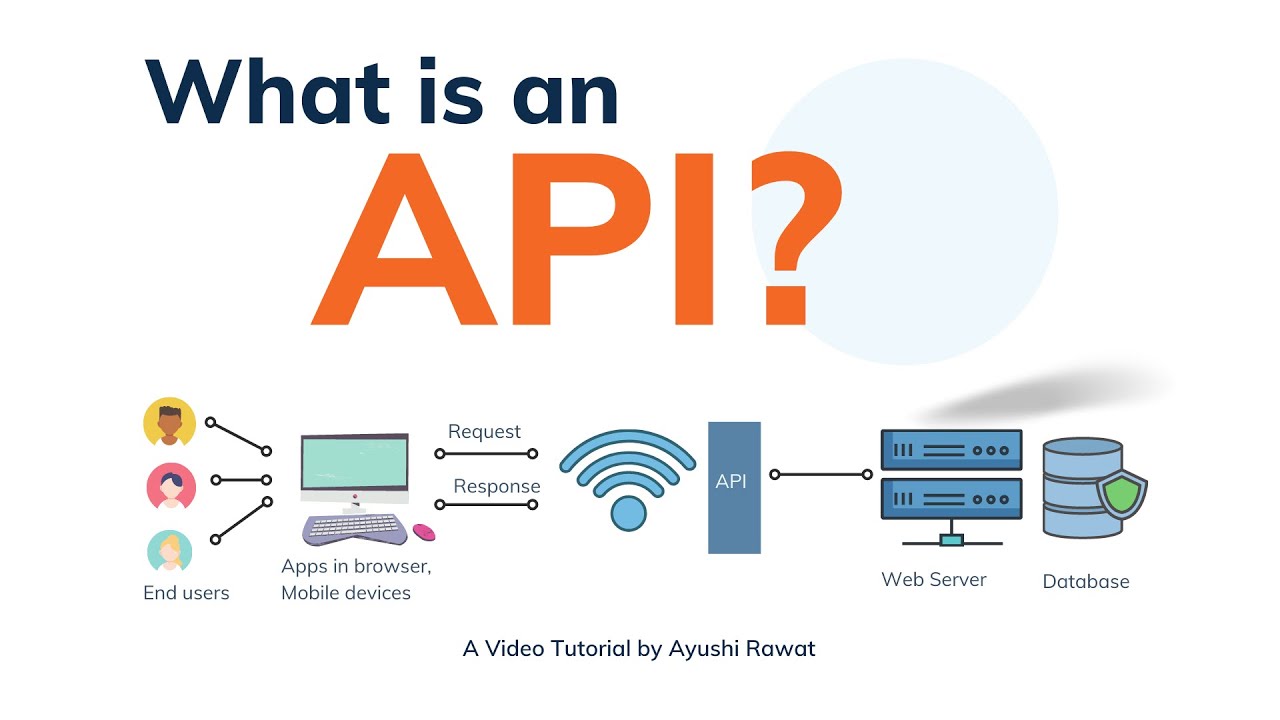
At its core, an API is a set of rules and protocols that allows different software programs to communicate with each other. You can think of it as a menu at a restaurant. When you look at the menu, it lists various dishes you can order, along with a description of each. You don’t need to know how to cook the food or how the restaurant operates; you just select what you want.
Similarly, an API serves as a menu for developers, providing them with a clear set of options for interacting with a service or application without needing to understand the underlying code or infrastructure.
Why are APIs Important?
APIs have become a lifeline in modern software development for several reasons:
- Integration: They allow different systems or applications to work together seamlessly. For instance, if you’re using a travel booking site, APIs let it communicate with airlines, hotels, and other services to provide you with the best options.
- Efficiency: APIs can streamline processes, allowing developers to build complex functionalities quickly and efficiently. Instead of creating every component from scratch, they can leverage existing APIs.
- Innovation: With the power of APIs, new applications can be built on top of existing platforms, allowing for innovation without starting from zero.
Think of your experience with social media logins, like signing into a new app with your Facebook or Google account. Behind the scenes, APIs facilitate that authentication process, making it simple for you, while enabling the app to connect to your social profile.
Types of APIs
APIs come in various forms, each serving different purposes. Let’s take a look at the most common types:
- Open APIs (Public APIs): These are available for public use. For example, Twitter’s API lets developers access tweets and user information.
- Internal APIs (Private APIs): Used within an organization, these APIs help connect different software systems internally. Companies like Spotify use internal APIs to ensure their services function smoothly behind the scenes.
- Partner APIs: These are shared with specific business partners and come with more restrictions than public APIs.
- Composite APIs: These allow developers to access multiple data sources or services in a single call. This is particularly useful for mobile applications where speed is critical.
Real-World Examples of APIs
A practical way to grasp how APIs work is to consider a few real-world applications:
- Google Maps API: If you’re building an app that requires maps or location services, Google Maps API allows you to integrate comprehensive mapping services into your application easily.
- Stripe API for Payments: When a website accepts payments, it often uses the Stripe API to process credit card transactions securely. This alleviates the need for businesses to handle sensitive payment information directly.
- Weather API: Applications that provide weather updates often integrate with various weather APIs, allowing developers to access real-time weather data without building their own infrastructure.
The Role of Documentation
One often-overlooked aspect of APIs is their documentation. Good documentation is crucial as it guides developers on how to use the API effectively. A well-structured API documentation typically includes:
- Clear descriptions of API endpoints
- Request and response formats
- Sample code snippets
- Error handling guidelines
In my experience, having access to robust documentation made learning and using APIs much easier. They can save hours of trial and error and empower you to leverage complex functionalities quickly.
In summary, understanding APIs is pivotal for any developer looking to innovate or integrate capabilities into their applications. APIs serve as the bridges that connect various software systems, enabling communication, efficiency, and creativity in technology. As you continue to explore the world of APIs, their significance and versatility will become increasingly apparent.
How APIs Work
Having gained a solid understanding of what APIs are, let’s now dive into how they function. Grasping the inner workings of APIs can help you not only in utilizing them effectively but also in troubleshooting and integrating them into your projects.
The API Lifecycle
The lifecycle of an API involves several key stages, which include:
- Request: This part begins when you, as a developer, send a request to the API. Imagine you’re ordering a coffee at your favorite café. You tell the barista what you want, and they relay that information to the kitchen.
- Processing: After the request is made, the API processes it. This involves the API interacting with the underlying application or database to retrieve or manipulate data based on your request. It’s a bit like the barista putting your order into the system, which then communicates with the kitchen to prepare your drink.
- Response: Once the data is processed, the API sends a response back. This response can include the requested data or a status message indicating success or failure. Think of this as the barista handing you your coffee, along with a friendly smile and perhaps a “Have a great day!”
Understanding these steps can simplify how you approach working with APIs, making it easier to build intuitive applications.
Request Types and Formats
APIs commonly use different request types, known as HTTP methods, to specify the action they intend to perform. The most common methods include:
- GET: Requests data from a specified resource. For example, fetching user data via an API endpoint.
- POST: Sends data to be processed to a specified resource. Imagine submitting a form on a website.
- PUT: Updates existing data. This might involve changing user profile information.
- DELETE: Removes data from the resource. Think of this as deleting a file from your computer.
Additionally, most APIs support data formats, with JSON (JavaScript Object Notation) being the most widely used due to its simplicity and readability. It’s like speaking the same language, making it easier for developers and systems to understand each other.
Endpoints and Resources
Every API consists of specific endpoints—a designated URL where requests are sent. Each endpoint corresponds to a particular resource. To illustrate, consider an online bookstore’s API that manages books and authors.
- Example Endpoints:
- GET /books – Retrieves a list of all books.
- POST /books – Adds a new book to the collection.
- GET /books/{id} – Retrieves details about a specific book.
- DELETE /books/{id} – Deletes a specific book from the collection.
By structuring endpoints this way, APIs become modular and extensible, allowing you to access or manipulate distinct pieces of data with ease.
Authentication and Security
As you begin using APIs, you’ll notice that many require authentication to keep data secure. The two most common methods for API authentication are:
- API Keys: A unique identifier that is passed in the request. It’s like a password that grants you access to specific features or data.
- OAuth: A more secure framework that allows users to grant access to their data without sharing credentials. It’s commonly used by applications that need to access user information on platforms like Google or Facebook.
In my experience, getting familiar with API authentication isn’t just about following protocols; it’s about understanding that security is crucial in building trust between users and applications.
Error Handling in APIs
Errors are an inevitable part of working with APIs, just like hiccups in any restaurant experience. APIs typically return status codes to inform you about the success or failure of a request. Some common status codes include:
- 200 OK: The request was successful.
- 400 Bad Request: There was an issue with the request format.
- 401 Unauthorized: Authentication failed or was not provided.
- 404 Not Found: The requested resource does not exist.
Understanding these error codes can significantly improve your troubleshooting skills, steering you toward effective resolutions.
In conclusion, knowing how APIs work can empower you to harness their potential fully. By recognizing the process of requests and responses, the importance of endpoints, and the best security practices, you can build robust applications that elegantly connect with various services. As you continue exploring APIs, you’ll find they are essential tools that enhance your development toolkit and facilitate seamless integration in a digitally interconnected world.
Using APIs
Now that you’ve got a good grasp of how APIs work, it’s time to talk about using them effectively in your projects. Utilizing APIs can significantly enhance your application by integrating existing functionalities without reinventing the wheel. Let’s explore the practical aspects of working with APIs, including finding, implementing, and taking full advantage of them.
Finding the Right API
Before you start coding away, it’s essential to choose the right API for your needs. A quick search can yield a multitude of options, but not all APIs are created equal. When selecting an API, consider these factors:
- Purpose and functionality: What do you need the API for? Be specific about the functionalities you want. For instance, if you’re developing a weather application, look for an API that provides real-time weather data.
- Documentation quality: Good documentation is your best friend. A well-documented API will have clear examples, setup instructions, and guides to help you hit the ground running.
- Community support: APIs with active user communities are more likely to provide you with resources, troubleshooting tips, and coding examples. It’s like having a network of fellow developers to lean on.
Personally, I’ve found APIs with decent community support much easier to work with because it alleviated a lot of my initial confusion when integrating new functionalities.
Setting Up and Making Your First Request
Once you’ve found the right API, it’s time to set up and make your first request. Here’s a step-by-step guide:
- Obtain API Keys: Most APIs will require you to register and get an API key, which you’ll use to authenticate your requests. Treat this key like a password—never share it publicly!
- Install required libraries: Depending on the programming language you are using, you may need libraries to interact with APIs. For instance, if you’re using Python, you might use
requests, while JavaScript developers often usefetch(). - Craft your request:Build a request using the appropriate HTTP method (GET, POST, etc.) and include your API key. For example, if you’re using the OpenWeatherMap API, a GET request for current weather might look like:
fetch('https://api.openweathermap.org/data/2.5/weather?q=London&appid=your_api_key')

.then(response => response.json())

.then(data => console.log(data)); - Handle the response: Once you make the request, you’ll need to handle the response. Verify that you receive the expected data and add error-checking to handle any issues (like bad requests or unauthorized access).
Getting comfortable with each of these steps enables you to maneuver through the integration process with confidence.
Integrating APIs into Your Application
When it comes to integrating an API into your application, there are several strategies you can take depending on your needs:
- Direct API Calls: This is the simplest method where you make API requests directly from your front-end application. For example, fetching a list of books and displaying them on a web page.
- Backend Integration: For more complex applications, you may want to make API requests from your server-side code. This can improve security and performance since sensitive keys won’t be exposed in the client-side code.
- Microservices: If you’re building a large application, consider using APIs as microservices to decouple functionalities. Each microservice can handle a specific task, such as user authentication or payment processing.
For a recent project, I used a backend integration approach to manage API calls to a third-party payment processor. This ensured that sensitive user data wasn’t exposed to the front end, keeping my application secure.
Best Practices for Using APIs
As with any tool, there are best practices to follow when working with APIs to ensure optimal performance and security:
- Rate Limiting: Be mindful of the number of requests you make to an API. Many services impose limits, and exceeding them could result in temporary bans.
- Caching: Store frequently requested data locally to reduce calls to the API and enhance performance.
- Error Handling: Implement robust error handling to manage issues gracefully. This might include displaying informative error messages to users instead of crashing your application.
- Versioning: Always be aware of the API version you are using, especially if updates are made. Adhering to the latest version ensures you benefit from improved features and security.
In conclusion, successfully using APIs can empower your applications with powerful features, saving you time and effort. By following a systematic approach to finding, implementing, and integrating APIs, along with adhering to best practices, you can create robust, efficient, and secure software. As you dive deeper into your projects, remain curious and adaptable—each API you encounter is an opportunity to enhance your skill set and build innovative solutions.

Best Practices for API Usage
Having explored how to effectively use APIs in your projects, it’s crucial to understand best practices that can elevate your API integration from functional to exceptional. Adopting these practices helps ensure not only effective communication with the API but also enhances performance, maintains security, and improves user experience.
1. Prioritize Documentation
You wouldn’t start driving without a map or GPS, right? Similarly, proper documentation is essential when working with APIs. Always begin by closely reading the API documentation provided. A robust set of documentation will typically include:
- Endpoint specifications: Know what each endpoint does and the required parameters.
- Authentication requirements: Understand how to authenticate your requests properly.
- Sample requests and responses: Reviewing these examples can save you significant debugging time.
Personal experience has taught me the value of good documentation. In one project, I overlooked the provided examples and ended up making redundant requests. If I had reviewed the documentation more closely, I would have avoided unnecessary complications.
2. Implement Robust Error Handling
APIs aren’t infallible; they can return errors, and how you handle those situations can significantly affect user experience. Employ thorough error handling measures by:
- Checking response codes: Always analyze the status code returned by the API. Different codes indicate different types of responses (e.g., success, client error, server error).
- Gracefully displaying error messages: Instead of letting your application crash, display helpful messages to users, guiding them on what to do next.
- Retry logic: For transient errors like network issues, designing your system to retry the request after a short delay can improve resilience.
During a project, I learned this lesson the hard way. My application showed generic error messages for API failures, negatively impacting user trust. A simple implementation of specific error messages transformed the experience for users.
3. Optimize Request Frequency
Managing how often your application makes API requests is crucial for performance and cost-efficiency. Here are strategies to consider:
- Rate limiting: Understand the API’s rate limits and plan your requests accordingly to avoid being throttled.
- Batching requests: Instead of making multiple calls, look for ways to combine them into a single request if the API allows. This reduces the load on both your application and the API server.
- Caching responses: Store frequently accessed data locally to minimize requests to the API. Caching can greatly enhance performance, particularly for data that doesn’t change often.
For example, in a weather application, rather than calling the weather API every minute, I implemented a caching strategy to refresh data every ten minutes. This not only improved performance but also kept my API usage within limits, saving on costs.
4. Secure Your API Keys
API keys are like the keys to your house; they need to be protected. To secure your API keys:
- Do not expose keys publicly: Never hard-code them into your application, especially in front-end code. Use environment variables or server-side configurations instead.
- Limit key permissions: If the API supports it, restrict your API keys to specific features you need. This minimizes risk in case of exposure.
- Monitor usage: Keep track of how your API keys are being used. Many services offer dashboards that can help you identify unusual activity.
I once witnessed a security breach where a poorly secured API key was exposed in a public repository. Later, I took extra precautions in my project to ensure the protection of sensitive data, which brought peace of mind.
5. Version Your API Integrations
APIs can evolve, and staying updated with new versions is essential for maintaining compatibility. Here’s how to manage versioning effectively:
- Always specify the API version: When integrating APIs, explicitly include the version number in the request URL. This ensures you’re using the correct specifications.
- Plan for deprecation: Keep an eye on announcements related to deprecated features and plan migrations accordingly to minimize disruptions.
- Test against new versions: Regularly test your application against new API versions in a staging environment before making any changes to production.
In my experience, proactive management of API versions allowed me to upgrade features gradually without facing serious downtime.
6. Monitor Performance and Usage
Keeping tabs on how your application interacts with APIs is crucial to understanding its performance. Tools like performance monitoring services can help you:
- Track response times: Keep an eye on how long API calls are taking, as slower responses can affect user experience.
- Identify bottlenecks: Understanding where delays occur can help you optimize those calls or transactions.
- Analyze usage patterns: Knowing how users interact with your API can help in planning for scaling or optimizations.
In one of my past projects, I implemented monitoring that revealed excessive calls to a specific endpoint. This insight ultimately allowed me to revise my caching strategy and optimize resource usage.
In conclusion, adhering to best practices for API usage will not only enhance your application’s performance and security but will also create a more reliable experience for users. By emphasizing documentation, error handling, optimization, security, versioning, and monitoring, you’ll position yourself to make the most of any API integration. As you continue to work with APIs, remember that the goal is to enrich user experience while maintaining robust, reliable functionality in your applications.
API Testing and Troubleshooting
Having established best practices for API usage, it’s now time to delve into the crucial areas of API testing and troubleshooting. Ensuring that your API integration works well is essential for providing a seamless experience to your users. Just like checking a car before a road trip, testing and troubleshooting your APIs can help identify potential issues before they become a problem. Let’s explore how you can effectively test your APIs and troubleshoot any bumps along the way.
1. Understanding the Importance of API Testing
Before diving into the nitty-gritty, let’s clarify why API testing is essential. Proper testing helps you verify that your API:
- Works as expected: You want to ensure that it returns correct data and responses.
- Handles error conditions effectively: Testing can reveal how well the API manages invalid requests or server errors.
- Integrates smoothly with your application: A well-functioning API should not disrupt the user experience.
Over the years, I’ve learned that neglecting API testing can lead to unforeseen problems. In one project, one of my API integrations returned inconsistent data, causing a significant issue that took time to resolve. It was a harsh reminder of the importance of thorough testing.
2. Types of API Testing
There are various types of tests you should consider when working with APIs:
- Unit Testing: Validate individual components of the API. Use tools like Postman or JUnit to test functions and methods within your code.
- Functional Testing: Ensure that the API functions as intended. Confirm that it can process requests and return accurate responses.
- Load Testing: Assess how well your API performs under various load conditions. Tools like JMeter can help simulate multiple users accessing the API.
- Security Testing: Verify that the API is secure from unauthorized access and vulnerabilities. This includes testing for authentication, data encryption, and resilience against common attacks like SQL injection.
- End-to-End Testing: Test the complete flow of data as it moves from one point of your application to another. This ensures that all components work together seamlessly.
In my experience, comprehensive testing across these categories allows you to spot issues early rather than dealing with the fallout later.
3. API Testing Tools
Choosing the right tools can make a huge difference in your testing process. Here are some popular tools used for API testing:
- Postman: A user-friendly tool for testing APIs that provides features for sending requests, viewing responses, and organizing tests.
- SoapUI: Primarily used for SOAP APIs but also supports REST. This tool allows for complex functional testing.
- JMeter: Perfect for performance and load testing. It can simulate multiple users and measure how well your API can handle traffic.
- Insomnia: An excellent alternative to Postman, offering a clean interface and powerful features for testing REST and GraphQL APIs.
I’ve personally preferred Postman for initial testing phases due to its intuitive interface, but JMeter has proven invaluable for stress tests when scaling applications.
4. Common API Issues and Troubleshooting Techniques
Despite careful testing, issues might still arise. Here are some common problems and tips for troubleshooting them:
- Error Codes:Recognizing HTTP status codes can provide immediate insight into issues. For example:
- 400 Bad Request: Fix your request syntax or input data.
- 401 Unauthorized: Check your API key and authentication mechanism.
- 404 Not Found: Verify that the requested endpoint is correct.
- Response Formats: Ensure that your application correctly parses the data returned from the API. A mismatch in expected data types, such as expecting JSON but receiving XML, can lead to errors.
- Time-Outs: If API calls are timing out, investigate network issues and evaluate the API’s performance under load. Consider implementing retry logic for transient errors.
- Version Mismatches: Make sure you are using the correct version of the API as specified in the documentation. This is crucial since APIs often evolve or introduce breaking changes.
Halfway through a recent application development, I encountered a frustrating issue where an API response was consistently timed out. After some digging, I discovered that the API’s endpoint had changed, which wasn’t initially caught because I hadn’t checked the documentation for updates.
5. Logging and Monitoring
Setting up logging and monitoring for your API is vital for ongoing success. Here’s why:
- Identify trends: You can track which endpoints are most frequently accessed and identify performance trends over time.
- Capture errors: Logs can help you capture and resolve errors, providing insights into your API’s health.
- User activity: Monitoring user activity can reveal unexpected patterns, helping you refine user experience.
In one of my projects, implementing logging allowed me to catch performance issues early, enabling me to adjust configurations before they impacted users significantly.
In conclusion, API testing and troubleshooting are not merely optional tasks—they are fundamental pillars of successful API integration. By employing comprehensive testing strategies, choosing the right tools, systematically troubleshooting common issues, and maintaining effective logging and monitoring, you can create robust applications that foster user trust and satisfaction. As you continue experimenting with APIs, embrace the mindset of continuous improvement—always be ready to adapt and refine your approach!
Future Trends in APIs
With a solid foundation in API testing and troubleshooting, it’s time to gaze into the crystal ball and explore the future trends in APIs. The landscape of technology and software development is continually evolving, and APIs are at the forefront of this transformation. Understanding these trends will not only keep you ahead of the curve but also empower your projects with the latest innovations and practices.
1. Rise of GraphQL
While REST APIs have dominated the landscape for years, GraphQL is rapidly gaining popularity as an alternative. Developed by Facebook, GraphQL allows clients to request exactly the data they need, which can minimize over-fetching and under-fetching issues. Some reasons for its rise include:
- Flexible Queries: Clients can dictate the structure of their queries, optimizing data retrieval.
- Single Endpoint: Unlike REST, which often requires multiple endpoints, GraphQL operates through a single endpoint, simplifying request management.
- Strong Typing: GraphQL schemas define types and relationships, offering better introspection capabilities.
In my own experience, implementing a GraphQL API streamlined data handling in a recent project, enabling us to provide a faster and more efficient user experience.
2. API-First Design
The API-first approach prioritizes API development from the outset of any project. This trend emphasizes creating the API before the actual application, ensuring that the API serves as the backbone of the application’s design. Here are a few benefits of this approach:
- Better Collaboration: Teams can work in parallel, with front-end and back-end developers aligning their goals and expectations from the start.
- Improved Documentation: As the API design evolves, comprehensive documentation can be created alongside, helping streamline the development process.
When I first adopted an API-first design for a mobile application, I observed a noticeable reduction in miscommunications between teams, resulting in a more efficient development cycle.
3. Increased Focus on Security
With the rise of API integrations, security has become paramount. The future will likely see an increased focus on API security protocols such as:
- OAuth 2.0 and OpenID Connect: These protocols will continue to be essential for secure authentication and authorization.
- Certificate Pinning: It helps prevent man-in-the-middle attacks by ensuring a client only accepts specific certificates.
- Rate Limiting by IP or User: This measure can prevent abuse and overload, protecting both the API and its users.
Security breaches in popular platforms have highlighted the need for stronger security measures. In my case, I made it a priority to implement stringent security measures on APIs I worked with, ensuring that sensitive data was protected and vulnerabilities were minimized.
4. Microservices Architecture
As applications become more complex, microservices architecture is gaining traction. This approach breaks down applications into smaller, independently deployable services, each with its own API. Key advantages include:
- Scalability: Teams can develop and scale individual services based on demand without impacting the entire application.
- Flexibility in Technology: Teams can use different programming languages and technologies for various services, optimizing performance and maintainability.
During a project that involved heavy data processing, converting a monolithic application to a microservices architecture granted us greater flexibility and clearer fault isolation.
5. Serverless APIs
Serverless architecture is gaining momentum, allowing developers to focus on writing code without worrying about server management. This trend involves using cloud providers, such as AWS Lambda or Azure Functions, to run functions in response to events. Benefits include:
- Cost Efficiency: You only pay for the compute time you consume, minimizing costs for low-usage applications.
- Auto-Scaling: As demand fluctuates, serverless APIs can automatically adjust resources, ensuring availability.
When I experimented with serverless architecture, I found the operational simplicity transformative. My focus shifted from managing servers to improving application functionality, ultimately enhancing user satisfaction.
6. API Management Solutions
With the proliferation of APIs, effective management and monitoring solutions will become increasingly essential. Tools that support:
- Documentation Generation: Automatically generating interactive API documentation can streamline onboarding for new developers.
- Analytics and Insights: Understanding usage patterns and performance metrics helps in optimizing APIs and improving user experience.
- Version Control: Managing changes and updates seamlessly ensures that clients can migrate to new versions without disruption.
Investing time in a solid API management solution has made me more efficient in maintaining APIs across various projects, proving invaluable in long-term planning.
In conclusion, the future of APIs looks bright, with exciting trends like GraphQL, API-first design, enhanced security techniques, microservices architecture, serverless solutions, and comprehensive management tools on the horizon. By staying informed and adaptable, you can leverage these emerging trends to build more efficient, secure, and user-friendly applications. With each advancement, it becomes increasingly clear that APIs will remain central to how technology evolves, pushing the boundaries of what we can achieve in software development. Embrace these trends, and watch as your projects thrive in the ever-changing digital landscape!
Conclusion
As we draw our exploration of APIs to a close, it’s clear that these powerful tools act as the backbone of modern application development. From defining what APIs are to discussing their future trends, we’ve journeyed through the essential facets of API usage. This final section summarizes key points and reflects on the pivotal role APIs play in shaping the technology landscape.
Recapping the Power of APIs
APIs have fundamentally transformed how software interacts. They allow disparate systems to communicate and collaborate seamlessly, fostering innovation and fueling the efficiency of application development. Let’s recap a few crucial aspects we covered throughout this discussion:
- Understanding and Functionality: We explored the foundational concepts of APIs, from their definitions to how they operate. APIs break down complex functionalities into manageable interfaces, allowing developers to focus on creating exceptional user experiences rather than reinventing solutions.
- Implementation Best Practices: Applying best practices ensures effective integration. By embracing documentation, error handling, security measures, and API monitoring, you fortify your application against common pitfalls and create a robust user experience.
- Testing and Troubleshooting: A solid API is only as good as the testing behind it. Proper testing strategies, coupled with meticulous troubleshooting, are vital to ensure compatibility and performance. Overlooking these aspects can lead to user dissatisfaction and software failures, as we explored through various examples.
- Future Trends: With emerging trends like GraphQL, serverless architecture, and the API-first approach on the horizon, the landscape of API development is expanding rapidly. Staying informed about these trends will empower you to leverage the most effective strategies and tools in your projects.
In my personal experience, understanding the shifts in API technology has profoundly influenced the success of the applications I’ve built. Anticipating these changes, such as incorporating a serverless architecture, not only simplified my workload but also significantly enhanced user performance.
The Road Ahead: Continuous Learning and Adaptation
The technology industry never stops evolving, and the same goes for APIs. It’s imperative to commit to continuous learning and adaptation. As new tools, frameworks, and methodologies emerge, adapting quickly can provide a competitive edge. Here are a few strategies to stay up-to-date:
- Engage with the Community: Joining developer forums, attending conferences, and participating in online discussions can expose you to new ideas and real-world applications of cutting-edge APIs.
- Follow Thought Leaders: Keep an eye on industry leaders and trendsetters who frequently share insights about the future of APIs and emerging practices.
- Experiment with New Technologies: Hands-on experimentation is often the best way to learn. Don’t hesitate to play with new APIs or tools, even in personal projects. This hands-on practice will solidify your understanding and make you proficient in using the latest technologies.
In my journey, I’ve found that experimentation often leads to discovering innovative solutions. For instance, experimenting with a new API for enhancing user authentication led me to implement a more secure and user-friendly experience.
Encouragement for Your API Journey
As you venture forth, keep in mind that mastering APIs is not only about technical skills but also about the broader picture of how they fit into the software development lifecycle. Embrace the challenges and opportunities that come your way, and remember that each project serves as an opportunity to refine your skills and innovate creatively.
- Start Simple: If you’re new to APIs, begin with straightforward projects. As your confidence builds, gradually take on more complex integrations.
- Collaborate and Learn Together: Collaborating with peers allows for shared learning experiences. You can exchange tips and tackle challenges together, enriching your understanding.
- Maintain an Open Mind: Technology changes rapidly, and remaining flexible in your approaches will serve you well in adapting to new demands and technologies.
In conclusion, APIs are instrumental in achieving seamless connectivity and reinforcing software systems’ top-tier functionalities. By applying the knowledge gained throughout this article, you will be well-equipped to navigate the exciting world of APIs, ultimately resulting in more innovative applications and enhanced user experiences. Keep exploring, learning, and pushing the boundaries of what is possible. The extension of your API knowledge today is the foundation for impactful solutions tomorrow!